Wed Feb 14 '18 Announcement
about 8 years ago
– Wed, Feb 14, 2018 at 12:44:34 AM
Dear Backers,
Happy Valentine’s Day and Lunar New Year! Here’s the fortnightly update on the project.
We’ve completed our next major software update for the camera. The feature we’re most excited about is the bluetooth sharing function. It allows you to share images directly to Android, Windows and macOS devices to share on social media. Auto-exposure for day to day use, also allows easier imaging overall. With the baseline performance stabilized, we will now work on astronomy imaging automation as the next major software milestone.
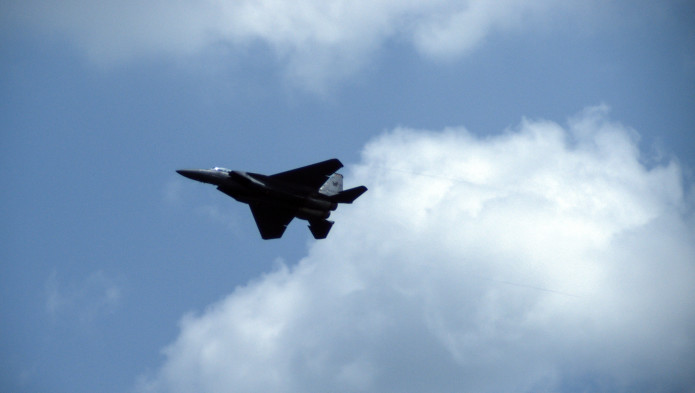
RSAF at the Singapore airshow 2018 - TINY1 with 100MM lens
Delivery estimate:
We have flashed the latest update on 252 Black and 84 Silver cameras. 100 cameras are going out for delivery today. The remainder of the lot will be sent by the end of next week.
We’re releasing the new software update (downloads below), here are the enhancements:
- Auto-exposure for daily image capture
- Pinch to zoom image gallery (allows ease of checking focus)
- Change gallery button to image preview
- Fix gallery item locking
- Fix GPS EXIF
- Fix GPS blinking icon
- Bluetooth sharing for files
- GPS test utility (shows visible satellites and signal strength)
- Better RAW format of both .DNG and .FITS support
Here are the known bugs reported:
- Short interval timelapse may crash with FITS/DNG selected. Causes resource conflict. Avoid using short intervals when writing those format (less than 10s interval)
- Level calibration offset by 90 degrees. Do not use, or use clear calibration function to get back to normal
- DNG colour calibration is slightly off.
- Card formatting does not work
- Gallery icon may disappear. Pressing the same location on the lower left will still bring you to the gallery
Software update
Software update is hosted on - batman.broke-it.net/Tiny1/ (special thanks to Bryan James)
Direct Windows updater link: http://bit.ly/2EEZILn
Direct Mac updater link: http://bit.ly/2HeUWTi
*please note Bit.ly will warn against the shortened link because its a direct download of an executable file. You may dismiss the warning
Software update checksums
We’re publishing checksums so that you can guarantee that the download is unaltered. This is just in case his server gets hacked or the download is interrupted.
How to verify checksum https://raylin.wordpress.com/downloads/md5-sha-1-checksum-utility/
*SHA256sums*
b4606da5dcfceda12bdbb8af6333878f5e09f9487b308834260fbce8f8444ba1 *Tiny1FirmwareUSBUpgrade1.5.1.dmg
a2a55880e4a64b3d5bb8c97ac7863b1763ff4a04481ec6703ad431b33edb516b *Tiny1FirmwareUSBUpgrade1.5.1.exe
*MD5sums*
04416ea9c09194e6a9f64d1ffad25d37 *Tiny1FirmwareUSBUpgrade1.5.1.dmg
25f3c946256b63b188ef1981511a00aa *Tiny1FirmwareUSBUpgrade1.5.1.exe
Once again, thank you to all the backers who continue to encourage and trust us to deliver on the project.
With the better performance on the new software update, we look forward to seeing the images you capture with the TINY1.
Best regards,
Grey
Tue Jan 30 '18 Announcement
about 8 years ago
– Tue, Jan 30, 2018 at 08:08:56 PM
Dear Backers,
Here’s the fortnightly update on the project.
Delivery estimate:
Currently we have 252 Black and 84 Silver cameras awaiting the latest firmware update to finalize before shipping out. Estimated delivery is middle of next week.
The part shortages from the previous batch has been mostly resolved. The supplier has recovered the lost components and we are going back on track for packing and delivery.
Once the firmware update is confirmed, we will send out the 48 hours notice.
Software update:
We’re expecting a new software update next week.
Here are the confirmed enhancements as of last week.
- Auto-exposure for daily image capture
- Pinch to zoom image gallery (allows ease of checking focus)
- Change gallery button to image preview
- Fix gallery item locking
- Fix GPS EXIF
- Fix GPS blinking icon
Here are the latest confirmed enhancements.
- Bluetooth sharing for files
- GPS test utility (shows visible satellites and signal strength)
- level calibration
Work in progress (not guaranteed in the coming update)
- Better RAW format, currently investigating .DNG and .FITS support
- Card formatting
- Wifi remote control
Software update
The previous software update is hosted on - batman.broke-it.net/Tiny1/ (special thanks to Bryan James)
Software update checksums
Since our software updates is kindly hosted by backer, Bryan James. We’re publishing the checksums so that you can guarantee that the download is unaltered. This is just in case his server gets hacked or the download is interrupted.
How to verify checksum https://raylin.wordpress.com/downloads/md5-sha-1-checksum-utility/
$ sha256sum *
44f54a3c9b01801e68485d4190c661f1bd6aa39270c4cb77bab89ea39dfc4cca Tiny1FirmwareUSBUpgrade1.1.0.dmg
6a16a85f12c180104af3529fd7035a5213c61c4b26b4717646678d2c971dafe8 Tiny1FirmwareUSBUpgrade1.1.0.exe
$ md5sum *
ae05cdd9c25fd35e4edc92cb377e65fb Tiny1FirmwareUSBUpgrade1.1.0.dmg
1406222cab8c408cab11f5f3b6d56ab1 Tiny1FirmwareUSBUpgrade1.1.0.exe
If the checksums are verified, you can safely dismiss the virus warning for the updater. (Just FYI: The warnings are triggered because 1: we're not yet a well known publisher 2: the updater changes low level files in an Android device.)
Thank you to all the backers who continues to encourage and trust in us to deliver on the project. While the size of the project, development and manufacturing timeline has expanded beyond our original expectations, we still aim to bring the astronomy experience to everyone.
Best regards,
Grey
Mon Jan 15 '18 Announcement
about 8 years ago
– Mon, Jan 15, 2018 at 02:25:54 AM
Dear Backers,
Here’s the fortnightly update on the delivery of the rewards.
We’ve shipped 400 cameras so far, which is lower than the forecast delivery volumes.
We were facing some difficulties with shipping the last batch of cameras due to several reasons. We would like to clarify them with you and seek your kind understanding.
1) Lens shortages
We have ordered the 100MM lenses ahead of the shipping period. When we were shipping the first few batches of camera, we realized that we received a defective batch of 100MM lenses that required replacement.
The replacement lenses were scheduled to arrive in our warehouse in November last year. However the supplier could not fulfill the quantities required. We took the first shipment of 60 lenses 2 weeks ago and we’re expected to receive another 60 this week. There is still a shortage of lenses and we are pressing the supplier to provide us the shortfall as soon as possible.
2) Adapter ring shortage
330 Nikon/Canon adapter rings were lost in a storage facility. We are negotiating with the parties involved to provide the replacement. However the earliest delivery estimate from the adapter manufacturer is mid-March 2018. We can resume shipping once the adapter rings arrive.
The above issues may have contributed to earlier backers not receiving their cameras till now, as we rearranged the fulfillment in the last shipment.
The shortages of lens and adapters were unexpected and we are seeking all avenues to resolve them. We hope to have your understanding on the matter as we seek to deliver all backer rewards.
Delivery estimate:
Currently we have about 350 camera components being assembled at our factory. We are estimating to push out another major delivery in about 2-3 weeks.
The subsequent batch of 250 cameras are estimated to deliver end Feb to middle of March 2018
Software update:
We’re expecting a new software update in 2-3 weeks. We’ve fixed a number of bugs and added functionalities. A few confirmed changes till date are as follows:
- Auto-exposure for daily image capture
- Pinch to zoom image gallery
- Change gallery button to image preview
- Fix gallery item locking
- Fix GPS EXIF
- Fix GPS blinking icon
Best regards,
Grey
Wed Dec 27 '17 Announcement
over 8 years ago
– Wed, Dec 27, 2017 at 04:00:49 AM
Dear Backers,
Here’s the fortnightly update on the TINY1. We wish all our Backers had a great Christmas break over the weekend and a Happy New Year!
Delivery
127 cameras were shipped yesterday morning. These cameras have the updated software system.
The quantity shipped was lower than forecast. The reason we fell behind schedule was due to the Christmas shipping rush. Our shipping service was unable to provide us with the shipping labels in time before our factory closed for the Christmas season.
As a result, our planned pre-Christmas delivery could not go through.
Currently the factory is still closed for internal stock-take and audit, but they put in overtime to ship out the cameras yesterday. We’re expecting to restart manufacturing 1st week of January and shipping from the end of January onwards.
Manufacture
We currently have 130 assembled cameras and 300 set of camera parts on hand for manufacturing and delivery.
We expect to have 400 cameras ready for delivery by 29th January 2018.
Software
For backers who have received the cameras and have not updated the software, here is the link to update it -
Windows - http://bit.ly/2CdEjrp
Mac - http://bit.ly/2zBYWbx
For backers who have updated the cameras, here are the list of known bugs. Most of them are expected to be resolved in the next software release.
- Self-Timer delay of 10 second not working. The delay is only 1 second
- Date and Time - December is missing
- Automatic setting of timezone not available - Please turn off set timezone manually and turn back on auto timezone after connecting to the internet.
- SD card not reading - Reboot after inserting/removing of SD card to resolve. Also works for “missing” images.
- Timelapse does not detect remaining memory - Please note that timelapse mode does not warn that memory is full and will not save additional images when that happens
- Auto Exposure for day to day use not completed - please swipe down and turn off pre-set mode for manual settings
- WiFi Hotspot not working until companion app is ready. We have started on it.
- Location bug - Please do not turn off GPS. It will not turn back on even if the indicator showers on. If it happens, you may want to reflash the camera with the updater. Please remember to save images from camera to external device before reflashing.
Other FAQ
- Do you support exFAT? - No. Unfortunately we cannot support exFAT format due to the high costs. “For certain device categories, such as cameras, camcorders, and digital photo frames, the software giant is charging a flat $300,000 license fee” https://arstechnica.com/information-technology/2009/12/microsoft-licenses-out-exfat-file-system/
- What format do you support - We support FAT32. Currently we require microSD cards to be formatted to FAT32 externally
- When will my camera arrive? - We hope to ship most of the campaign orders (super early bird, early bird and pre-order special) by end of January. InDemand orders will be fulfilled through Feb and March.
Please note that due to high query volumes, we may take more time to reply to backer queries than usual.
Sincerely,
Grey
Fri Dec 8 '17 Announcement
over 8 years ago
– Fri, Dec 08, 2017 at 08:01:41 AM
Dear Backers!
We've been working round the clock for this software update. We apologize for the slower response to backer queries. I'm glad to say that we have managed to resolve the major bugs in the first two releases.
Here's the instructions to update your camera
Please follow the instructions carefully and exactly in the sequence as follows or the camera can be irreversibly damaged.
Step 1: Download updater (700MB)
Windows Download Link: https://we.tl/LS3ql6ighT
Mac Download Link: https://we.tl/INDcpZXPDv
Step 2: Prepare for Installation
- Please ensure the camera is at least 75% charged before proceeding.
- Plug TINY1 into the PC/Mac via the USB micro cable.
- Please ensure the cable is good quality and in good condition.
- Please go into menu>Reboot to Bootloader as per the image above
Step 3: (For Windows users only) Installing latest USB Drivers
Download these drivesr from Google: https://dl-ssl.google.com//android/repository/latest_usb_driver_windows.zip
Installation instructions: https://developer.android.com/studio/run/oem-usb.html#InstallingDriver
Step 4: Installation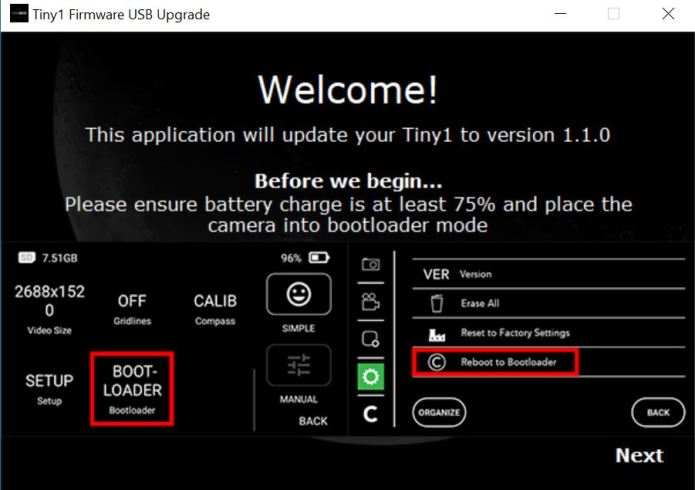
- Run the installer program.
- Windows Defender/Anti-virus may present alerts. Please dismiss the alerts. The cause for the alerts is because we're not in the list of common publishers. Anti-viruses will run scans and will clear the software. (Please ensure you only download from the links we provide.)
- Please follow the on-screen guide
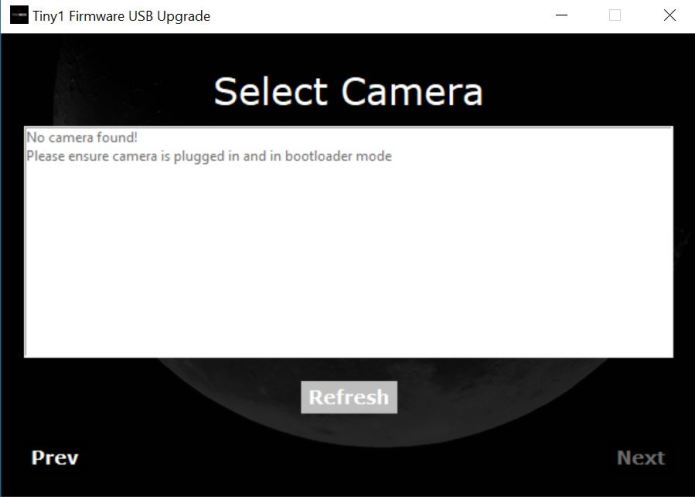
- If this screen appears, either TINY1 is not in Bootloader Mode/not connected properly to the PC. Please check if TINY1 is in the correct mode. Also ensure that the cable is secure, and directly connected to the PC/Mac. (i.e. not via a hub)
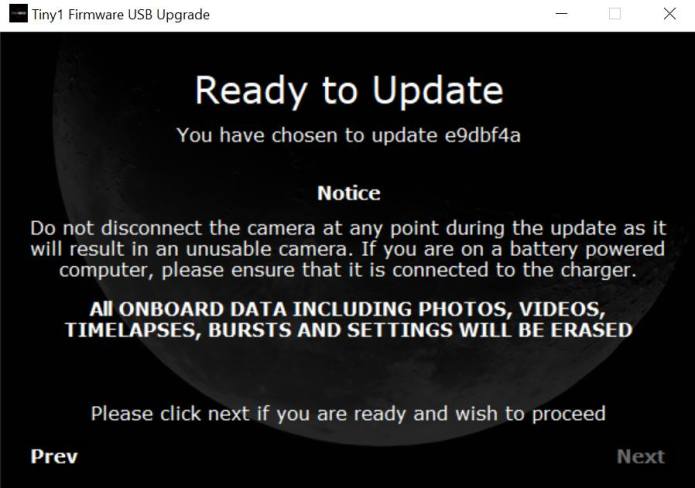
- If this screen appears, you are good to go.
- Please ensure no images that you want to preserve, is in the camera. The upgrading process will permanently remove all existing data on the camera
When the camera is updating, the progress bar and updater software may flash/appear to stall/appear to hang. Do not remove the camera from the PC/Mac until the updating process is complete.
Once the updater is complete, a successful update screen will appear. You may disconnect the camera from the PC/Mac.
Step 5: Post installation
Once rebooted - immediately reboot the camera again
- Please key in the time zone under settings>more settings>Location /Time Settings
- IMPORTANT: Reboot the camera
- After reboot, please connect to a wireless hotspot for accurate time updating. The option is found under Settings>more settings>WiFi Settings
- Please check to make sure the time is updated correctly.
Step 6: GPS location calibration (Optional)
- You may want to get GPS location information for star maps to work. Simply operate the camera in an open sky area (i.e. no trees/closely packed buildings). The GPS location will update itself.
- GPS lock can be determined from the drop down menu on the main screen. The top of the drop down menu would report the coordinates when GPS lock is achieved
- Please note that star maps may not operate accurately indoors.
- Please ensure that location is turned on to perform this step.
FAQ:
1) Why is my screen purple/red - IR filter is disabled. Swipe down to access the drop down menu and press the IR Filter to enable it
2) Drop down menu says NaN, NaN - ensure the camera location is enabled and camera is operating in open sky
3) My time is wrong - ensure setup with WiFi connected. Verify correct timezone is selected in menu
4) My gallery images are not in sequence - rebooting will typically solve the issue. Alternatively, remove all old images from camera and ensure correct date and time is set
5) My preview and images have strange color - Auto White Balance is still work in progress. Use the drop down menu to disable Capture Presets and set the white balance with the button "WB"
Manufacturing
Key components for manufacturing is expected to arrive in our factory early next week. With the new software and the components in, we expect to start shipping in 2-3 weeks time.
We may not be able to answer all shipping questions in a timely fashion as we expect to spend most of our time in the factory coordinating the manufacturing.
Thank you for your support and kind patience! We couldn't have come so far with out you guys.
Cheers,
Grey