Tue Apr 23 '19 Announcement
almost 7 years ago
– Tue, Apr 23, 2019 at 03:47:18 AM
Here's the update link for Version 2.2.0
http://update.tinymos.com/tiny1/
Apologies for not attaching it in the previous update.
Cheers,
Grey
Tue Apr 23 '19 Announcement
almost 7 years ago
– Tue, Apr 23, 2019 at 02:56:08 AM
Hi Backers,
Here's an update on the TINY1 project.
Over the past few months, the software team in TinyMOS has been working on a new firmware for the TINY1 backers. Although the last firmware had been quite stable, we wanted to introduce new features that would enhance the image quality of the TINY1 camera and the user experience.
TINY1 Firmware Version 2.2.0
New features:
- Added Sensor Calibration option to settings
- Updated Dark noise subtraction: requires initial sensor calibration to work correctly (see instructions below)
- Manual exposure metering
- Re-calibrated camera sensor against X-rite ColorChecker Classic standard for more accurate colours
- Noise reduction enabled now produces cleaner RAW and JPEG. Original RAW and JPEG will be written as filename xxx.RAW or xxx.jpg respectively. Noise reduced version filename saved as xxx_NR.RAW xxx_NR.JPG.
Fixes:
- Fix timelapse unable to generate video if number of images is set to 480 and above
- No more crashes when thumbnail queue is jammed
- Improved gallery loading speed
- Minor UI tweaks
- Stability improvements
How to fully activate noise subtraction:
Time needed for calibration is just a rough estimate. Since this may take hours to be done, please plan ahead of time when the camera should be calibrated.
[Recommendation: leave the camera plugged in and do the calibration overnight]
Initial sensor calibration steps
- Install the 4mm kit lens on the camera, with its front lens cap on.
- Ensure that the cap seals tight and there is no light leaking into the lens.
- Plug camera to wall charger.
- Go to Camera settings. (Top left icon)
- Tap the Gear (fourth) icon on the left hand side of the screen.
- Scroll down the list, find and tap the "Sensor Calibration" option.
- Tap the "Start" button.
PS: Please do not interrupt the process. Once the calibration is canceled, the whole process will need to be redone.
Best regards,
Grey Tan & TinyMOS Team
Mon Jan 14 '19 Announcement
about 7 years ago
– Mon, Jan 14, 2019 at 03:26:15 AM
Dear Backers,
Here’s an update on the TINY1 crowdfunding project.
Happy 2019!
Here’s our first backer update in the new year and we have good news to share!
TinyMOS has launched NANO1 successfully on Kickstarter and we’re working on improving the low light capabilities of both NANO1 and TINY1.
Dark Noise Subtraction
TinyMOS is fine tuning the dark noise subtraction for TINY1. The main algorithm is complete. We’re fine tuning the parameters, as well as the dark noise library implementation.
Here’s an image before and after dark noise subtraction.
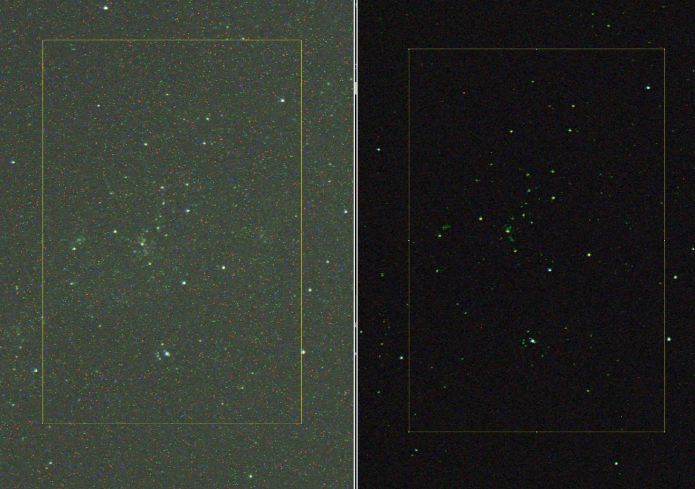
We’ve managed to reduce most of the speckles and hot pixels with our process, while keeping the stars. Image is blown up by 200% to highlight the noise for comparison.
NANO1 fully funded!
NANO1 crowdfunding is ending in 3 days. What that means is that backers who haven’t receive their TINY1 will be receiving their NANO1 soon!
We’ve raised S$200,000 out of the S$120,000 goal. We’re pushing for higher funds raised to serve the TinyMOS community even better, with more accessories and better software support.
Do help us share it with your friends and family and on your social media accounts!
The campaign is live at get.tinymos.com
Best regards,
Grey
Mon Dec 10 '18 Announcement
over 7 years ago
– Mon, Dec 10, 2018 at 03:23:41 AM
Dear Backers,
Here’s an update on the TINY1 crowdfunding project.
New software update
We’re excited to release our latest software updates for the TINY1 camera. The new software improves stability and functionalities of the TINY1. The improvements include:
- Add “Cancel” button for time-lapse configurations
- Switch to RTSP for Live Stream
- Fixed bug where time-lapse configuration does not sync with camera
- Change “File Sharing” to “File Transfer”
- Add blackout screen when camera is recording video
- Long click on time-lapse to select file type to download (for time-lapses and bursts)
- Add scroll-able file name when file name is too huge to fit into label
- Request location permission to display connected Wi-Fi name in Android O and above
TinyMOS is committed to bringing astronomy imaging to everyone and will continue to bring new features and updates to the TINY1.
NOTE:
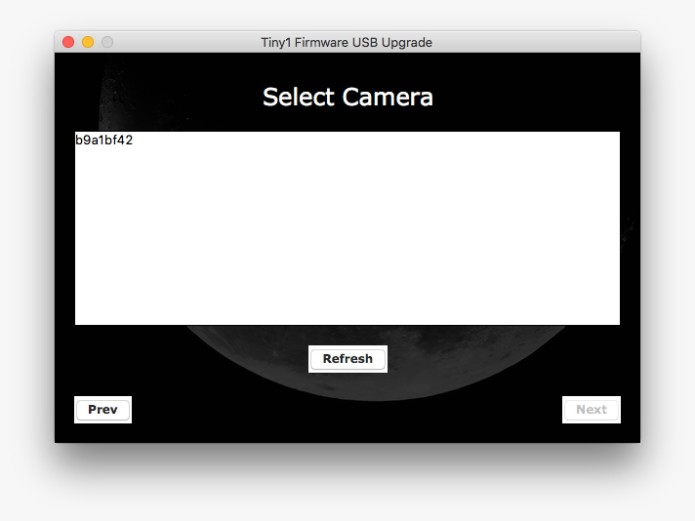
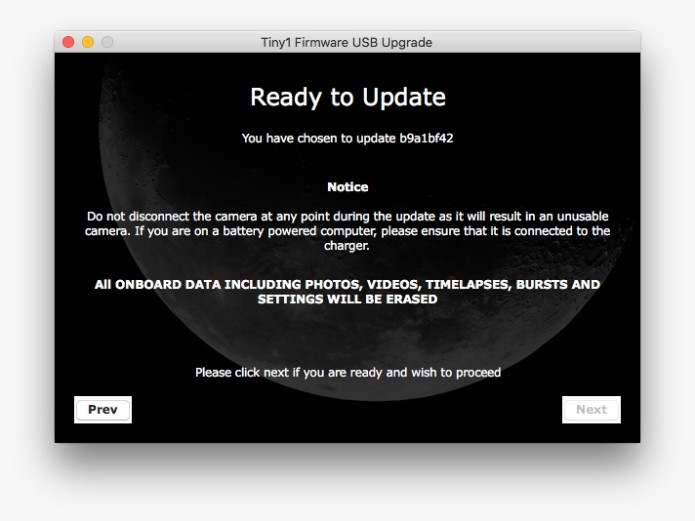
In the latest macOS versions, the buttons on the updaters may not be visible. Please refer to the following images for the correct location of the button locations.
Please download the update from the link above and follow the instructions here from step 2 onward https://bit.ly/2t8RSFo
NANO1 Launch
After a year of R&D and planning we are finally launching the successor to the TINY1.
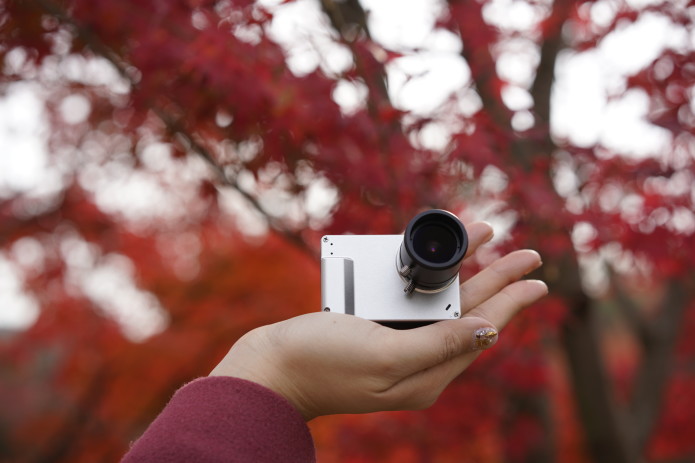
The NANO1 is going live in 2 days time at 7AM EST on 12/12/2018 at get.tinymos.com
For backers who have yet to receive the TINY1 will soon be receiving the new NANO1 camera. We're excited to put astronomy in your hands with the new and improved NANO1 camera!
For backers who have received their TINY1, launching the NANO1 means growing our team and providing better support and features on our first product.
Crowdfunded projects succeed from the support of our backers. With your support, we will make the eco-system better every year.
We hope you can see you on launch day! Do also help us spread the word about the NANO1!
Best regards,
Grey
Fri Nov 9 '18 Announcement
over 7 years ago
– Fri, Nov 09, 2018 at 07:44:50 AM
Dear Backers,
Here’s an update on the TINY1 crowdfunding project.
iOS app released!
The iOS app has been tested by our team and sent to Apple for review. After a few rounds of review and clarification we have finally launched our TINY1 companion app on the Apple App Store!
Backers on iOS can now download them on the App Store.
Note:
Please note that the latest camera firmware update is required for compatibility.
The app is compatible with iOS 11 and more recent only.
The video preview on the remote app will appear to hang when video is being recorded. The camera is functioning normally. Preview will re-enable itself when recording is stopped.
New camera firmware release
We’re glad to release the latest firmware upgrade to the TINY1. It features compatibility with the newly released iOS application, better stability and the much anticipated software development API.
Now software development savvy backers can help to write control applications, to improve their user experience of the TINY1 camera, and share their innovations with the community.
We'll be releasing the API documentations in the next update as we compile them.
Install the latest updates here at: https://update.tinymos.com/tiny1
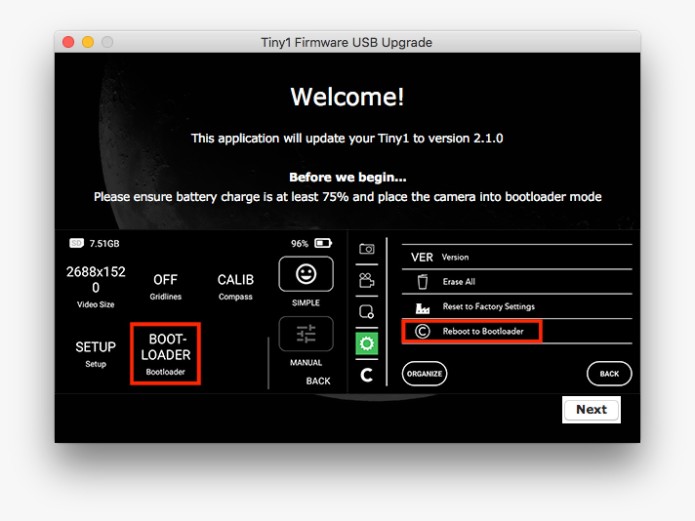
NOTE:
In the latest macOS versions, the buttons on the updaters may not be visible. Please refer to the following images for the correct location of the button locations.
Please download the update from the link above and follow the instructions here from step 2 onward https://bit.ly/2t8RSFo
NANO1
We’re still preparing for the NANO1 camera crowdfunding project. Be sure to stay tuned on the latest news for NANO1 by subscribing to our mailing list on www.tinymos.com.
We try to provide new blog posts every 1-2 weeks on the NANO1’s progress ahead of the launch at https://www.tinymos.com/nano1 as well.
Store
We’ve backers asking us to reinstate our web-store. The new web-store for TINY1 accessories is now back online. Visit it at https://www.tinymos.com/store
A big thank you to everyone who backed the TINY1 project!
Best regards,
Grey